GPS tracking powered by InstaMapper.com
Wednesday, December 8, 2010

Friday, May 21, 2010
Tablet History 1 - Introduction
PICTORIAL HIGHLIGHTS OF TABLET HISTORY
Part I: Introduction
As an amateur tabletologist and member of the International Society for the History of Tablets, I've lately been asked quite a few questions about the place of Apple's iPad in the history of tablet devices.
For example:
1) What is the place of Apple's iPad in the history of tablet devices?
Other questions revolve - and evolve - around Apple's innovation. For example:
2) Is the iPad revolutionary, evolutionary, or kleptolutionary?
And then there's the panicky cry from every Applehead's nightmares:
3) Where do I plug in my one-button mouse?
I'm pleased to offer here extracts from my research paper, "Toward a Unified History of Tablet Devices."
(There have been hints that it will appear in the Bulletin de la Société Internationale pour l'Histoire des Tablettes (BullSIHT)! Real soon! Someday.)
The study is needed because tabletology is a highly-charged field of research, as I'm sure one can imagine, and individual tabletologists (and there are great ones) often disagree on the timespan and naming of various eras.
But they (almost) all agree that a "tablet" is something for communications ... that's at least, oh, let's say about 5" x 7" ... and that's portable.
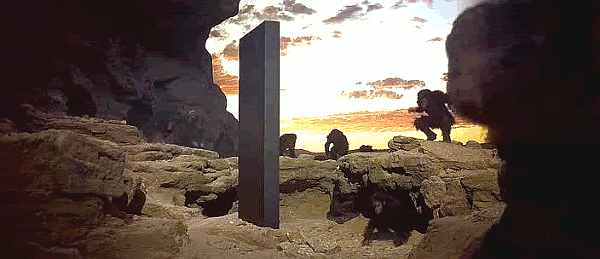
Clearly the 11-foot monolith from Stanley Kubrick's movie, 2001: A Space Odyssey, does not meet this last requirement. And yet, it was probably fun to monkey around with.
What's ahead in these Pictorial Highlights of Tablet History:
Part I: Introduction
-- I invent a field of study, a phoney Society, and a bogus journal
(Okay, that's not ahead ... you're reading it now.)
Part II: The Lithic Era
-- Paleolithic (ancient) and Neolithic (modern) Tablet Stone Ages
Part III: The Lignum Era
-- Writing on wood (or rather, on fiber)
Part IV: The Expansion Era
-- 20th- and 21st-century devices that can be expanded
Part V: The Restrictive Era
-- Devices that restrict users
Part VI: The Future
-- From the 22nd century onward!
Part VII: Conclusions
-- The Stone Age and the future
Part VIII: Comparisons
-- Comparing the devices in this study
Part IX: Methodology
-- How this pictorial history happened
Stay tuned for all IX exciting episodes!
Friday, June 13, 2008
Vasha's blurb
S/F, 2 1/2 Years, German Shepherd Dog, 70 lbs.
Hey there!
I'm your typical AWESOME German Shepherd Dog! If you know our breed, you know what a fantastic package you're getting! If you don't, let me tell you what a treat you're in for!
I'm beautiful, of course! And smart, adaptable, athletic, intelligent, loving and loyal to my family, dependable, clever, energetic, brave, and, ummm ... smart! Are you up to the challenge?
I have more pictures here on dogster.com! You might notice that I need to learn "Drop it!" And most of the other "tricks" that make life go smoothly for a doggy gal and her family, like "Heel," "Down," "Stay" ... you get the picture.
But never fear! I can learn these things easily! I'm very treat-motivated, and did I mention that I'm smart?
In fact, breeds like German Shepherds that have worked for humans for centuries must feel useful and know that they're doing things for their people. If we don't, we'll think up our own projects. Like digging up the yard. Wouldn't it be better for me to learn fun stuff with you? I think so too!
I've been reported to be good with kids that I know but not able to get along with cats at all. Dogs that are unfriendly to me make me mad, and we can't be together. With other dogs, we'll have to meet and see if we get along.
I'm not a nuisance barker. I am house-trained, of course, and need outdoor activity, but like all dogs I also need to be inside with my family, especially at night.
There are good times ahead for the family that takes home this young, "interactive" (and smart!) dog! Let's meet! Come throw a ball for me!
Wednesday, March 5, 2008
Saturday Night Massacre at MaxFund
[Thursday] This post is a duplicate of the one I put on Tucker's blog, which is why I mention doggies.
[Later] I've invited MaxFund volunteers to come here to discuss this situation or actually any other that's too controversial for the official volunteer forum.
Essentially nobody else knows about this blog, except that it's been mentioned all of twice, I think, on Tucker's blog. So it should be relatively safe.
mr_ed: Sorry, doggies, but I gotta butt in here.
35 years ago, President Nixon told Attorney General Elliot Richardson to fire Archibald Cox. Richardson had appointed Cox independent special prosecutor for the Watergate break-in.
Richardson had promised Congress that he wouldn't interfere with Cox, so he refused the President's order and resigned in protest.
Nixon then told Deputy Attorney General William Ruckelshaus to fire Cox. Ruckelshaus had made the same promise to Congress, so he refused and resigned as well.
Nixon finally got satisfaction from the number three man in the Justice Department, Solicitor General Robert Bork. Bork hadn't made any promises to Congress. Cox was fired.
The media dubbed the loss of Richardson, Ruckelshaus, and Cox in one weekend the Saturday Night Massacre.
Details are sketchy at this time, as they say in the media, but it sure sounds to me as though MaxFund had its own version of the Saturday Night Massacre, but on a Tuesday night.
MaxFund apparently has an Advisory Committee as well as a Board of Directors. I hadn't heard of the Committee before, but it seems to hold the trump cards.
As told to me, the Committee decided to fire Lori Moss, who's been something like the operational head of MaxFund and also its shelter manager.
Lori hadn't been fired as of 10:19 Tuesday night, but....
Full disclosure: I like Lori, I consider her a friend, and I strongly disagree with firing her.
I've volunteered with MaxFund for maybe a year and a half, and this isn't the first or second abrupt dismissal of top people that I've witnessed. Never mind the ones that I've heard about happening before I started there.
But this one takes the cake ... if, indeed, there's any cake to be taken.
Since MaxFund politics have nothing to do with Tucker or Sinjin, I won't make it a cause célèbre of this blog. But I'm really steamed and wouldn't have been able to get to sleep without working off some energy on the issue.
Since I'm Volunteer of the Month and all.
Now what do I do?
-- ⅇⅆ
p.s. - it's snowing
[Later] I've invited MaxFund volunteers to come here to discuss this situation or actually any other that's too controversial for the official volunteer forum.
Essentially nobody else knows about this blog, except that it's been mentioned all of twice, I think, on Tucker's blog. So it should be relatively safe.
❧❧❧❧❧❧❧❧❧❧
mr_ed: Sorry, doggies, but I gotta butt in here.
❦❦❦❦❦❦❦❦❦❦
Saturday Night Massacre?
❦❦❦❦❦❦❦❦❦❦
Saturday Night Massacre?
❦❦❦❦❦❦❦❦❦❦
35 years ago, President Nixon told Attorney General Elliot Richardson to fire Archibald Cox. Richardson had appointed Cox independent special prosecutor for the Watergate break-in.
Richardson had promised Congress that he wouldn't interfere with Cox, so he refused the President's order and resigned in protest.
Nixon then told Deputy Attorney General William Ruckelshaus to fire Cox. Ruckelshaus had made the same promise to Congress, so he refused and resigned as well.
Nixon finally got satisfaction from the number three man in the Justice Department, Solicitor General Robert Bork. Bork hadn't made any promises to Congress. Cox was fired.
The media dubbed the loss of Richardson, Ruckelshaus, and Cox in one weekend the Saturday Night Massacre.
➥
Details are sketchy at this time, as they say in the media, but it sure sounds to me as though MaxFund had its own version of the Saturday Night Massacre, but on a Tuesday night.
MaxFund apparently has an Advisory Committee as well as a Board of Directors. I hadn't heard of the Committee before, but it seems to hold the trump cards.
As told to me, the Committee decided to fire Lori Moss, who's been something like the operational head of MaxFund and also its shelter manager.
- The Advisory Committee told the Board of Directors to fire Lori Moss;
- The Board of Directors refused;
- The Advisory Committee disbanded the Board of Directors
Lori hadn't been fired as of 10:19 Tuesday night, but....
Full disclosure: I like Lori, I consider her a friend, and I strongly disagree with firing her.
⚔
I've volunteered with MaxFund for maybe a year and a half, and this isn't the first or second abrupt dismissal of top people that I've witnessed. Never mind the ones that I've heard about happening before I started there.
But this one takes the cake ... if, indeed, there's any cake to be taken.
Since MaxFund politics have nothing to do with Tucker or Sinjin, I won't make it a cause célèbre of this blog. But I'm really steamed and wouldn't have been able to get to sleep without working off some energy on the issue.
Since I'm Volunteer of the Month and all.
Now what do I do?
-- ⅇⅆ
p.s. - it's snowing
Saturday, November 10, 2007


Subscribe to:
Posts (Atom)